
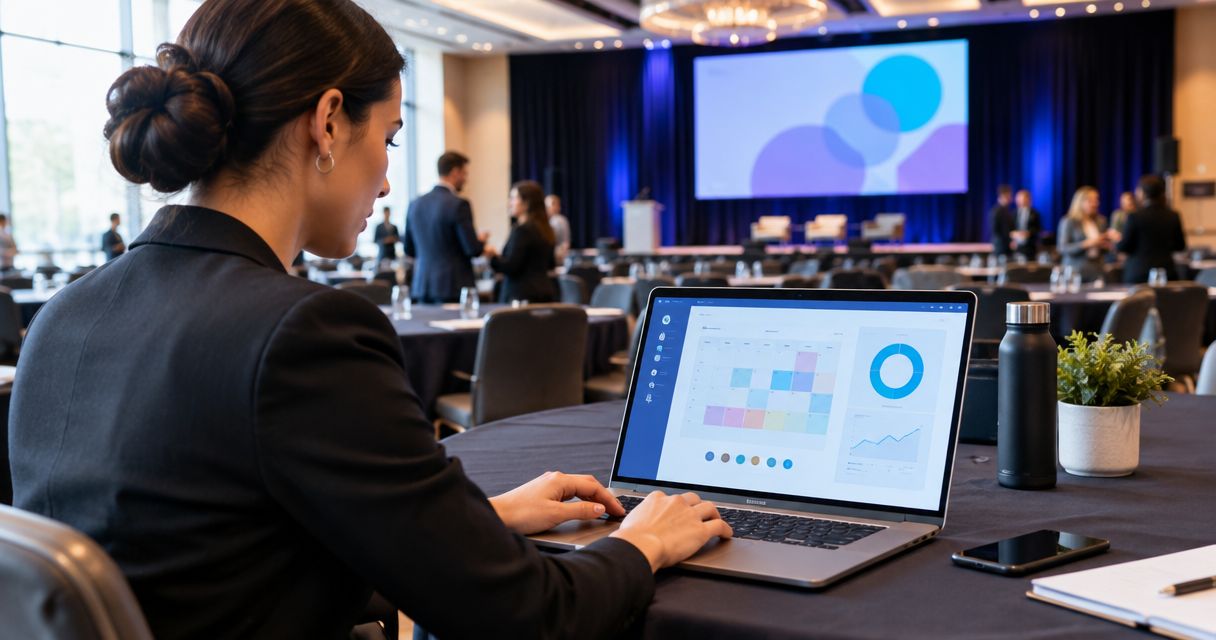
The event planning software features that matter for conferences and conventions connect registration, attendee records, QR badges, check-in, schedules, speakers, sponsors, exhibitors, and staff responsibilities. Evaluate those features as one operating workflow: a registration change should lead to a clear next action, not another round of spreadsheet reconciliation.
TL;DR
Prioritize event planning software features that connect registration, check-in, schedules, and team coordination.
Gathersmith LLC provides connected event registration and operations for conferences, expos, and conventions.
Test changes and exceptions, not just successful registrations, before choosing conference software.
Separate event admission from session access when planning badges, schedules, and check-in procedures.
What event planning software features do conferences need?
Conferences need features that carry reliable information from registration through arrival, programming, partner coordination, and staff handoffs. Start with the decisions your team must make, then identify the information each decision requires.
Gathersmith LLC brings registration, QR badges and check-in, schedules, speakers, sponsors, exhibitors, and team operations into one configurable workspace. Use that connected scope as a practical reference when defining your requirements, without treating any feature list as proof that your specific workflow is covered.
| Feature area | Operational question it should answer | What to examine |
|---|---|---|
| Registration | Who is attending, and what did they select? | Relevant fields, ticket categories, record changes |
| Badges and check-in | Who has arrived, and which record belongs to them? | QR workflow, lookup, exception handling |
| Schedules and speakers | What happens where, when, and with whom? | Session details, room changes, speaker coordination |
| Sponsors and exhibitors | What information and responsibilities belong to each partner? | Contacts, participation details, outstanding actions |
| Team coordination | Who owns the next action? | Assignments, handoffs, current operating information |
A feature is useful when it resolves an operational decision your team actually faces. A long menu of capabilities does not establish that registration staff, program managers, and partner coordinators can complete their work together.
Why this matters
For a 2026 conference, your requirements should describe how information moves between people, not simply which modules appear in a sales presentation. A record can be correct in registration while the badge desk still acts on an outdated copy. Your evaluation should expose that disconnect before the event.
Work backward from the attendee experience. Someone registers, receives the necessary information, arrives, checks in, and follows the program. Behind those actions sit staff decisions about identity, admission, room assignments, speaker changes, and unresolved requests.
The software does not replace those decisions. It should give the responsible person enough context to make them and show colleagues what happens next. Write down that expectation before comparing interfaces or collecting feature checkmarks.
Registration features: collect information people will use
Start registration design with an information map. For every proposed field, identify its purpose, its owner, and the point at which someone will use it. If nobody can explain the action attached to an answer, reconsider asking the question.
An attendee name supports identification. An organization field can support badge preparation when your badge design calls for it. A session choice only belongs on the form if your event uses that choice to organize participation; collecting it without an operating plan creates ambiguity.
Distinguish between registration details and admission rules. A ticket category describes what someone registered for, but staff still need a clear explanation of what that category permits. Do not expect a label alone to communicate every event policy.
Use a simple requirements worksheet:
Information needed: What must the attendee provide?
Reason needed: Which operational task depends on the answer?
Person responsible: Who reviews or acts on it?
Change procedure: What happens if the attendee corrects it?
Downstream effect: Which badge, list, or staff decision needs updating?
For your 2026 evaluation, enter a registration and then change a meaningful detail. Follow that change through the workflow instead of stopping when the form submits successfully.
Prioritize understandable registration records over collecting every possible detail. More fields give your team more information to maintain, not automatically more useful information.
QR badges and check-in: test the exception path
QR badges connect a physical arrival to an attendee record. The useful evaluation question is not merely whether a code scans; it is whether staff can interpret the result and take the correct action.
Ask for a demonstration that follows an attendee from registration to badge preparation and arrival. Confirm what the check-in operator sees, what action confirms arrival, and what happens when staff cannot immediately identify the correct record. Treat each answer as a requirement to verify, not a capability to assume.
Your test should also include a name correction and an attendee who cannot present the expected badge or code. These cases reveal whether the operating procedure is understandable under pressure. They also show where a supervisor must step in.
Compare the handling of arrival situations rather than comparing providers:
| Arrival situation | Best suited to | Benefit | Limitation to address |
|---|---|---|---|
| QR-based identification | Attendees presenting the expected code | Connects the presented badge or confirmation to a record | Staff still need instructions for unexpected results |
| Staff-assisted record lookup | Attendees needing help identifying their registration | Gives staff a route to investigate the record | Matching details requires a defined identity-checking procedure |
| Supervisor review | Unresolved admission questions | Keeps policy decisions with an accountable person | The escalation owner must be reachable |
Ask whether the software supports the routes you need, then document the human procedure around them. A successful scan is not a complete check-in plan.
Schedules and speakers: make changes traceable
A conference schedule links sessions, times, rooms, and speakers. Evaluate those relationships together rather than reviewing a calendar in isolation. A room change matters to the program team, the speaker, the staff directing attendees, and anyone reading the published schedule.
For a multi-track event, define the information required for every session. Include its title, location, timing, responsible organizer, and associated speakers wherever those details apply. Then decide who approves a change and which version staff should treat as current.
During your 2026 demonstration, change a session location after the initial schedule is prepared. Ask the demonstrator to show where the revised information appears and explain any separate steps needed to communicate it. Do not assume that editing a schedule automatically updates every message or printed asset.
Speaker coordination needs its own ownership rules. Identify who confirms session details, who handles a replacement, and who resolves a mismatch between a speaker's expectations and the program. A speaker record does not settle those responsibilities by itself.
Choose schedule features around your change process, not just the appearance of the agenda. A clear publication workflow matters more operationally than a polished view that leaves staff uncertain about which details are approved.
Sponsors and exhibitors: connect partners to responsibilities
Sponsor and exhibitor coordination requires more than storing an organization name. Your team needs to understand which contact handles which matter, what participation details require confirmation, and which organizer owns the next response.
Keep the requirements grounded in your event. An expo with exhibit spaces needs different working details from a conference with sponsor acknowledgments but no exhibition floor. Do not add a partner-management requirement merely because another event uses it.
Define the handoff between partner coordination and attendee operations. If an exhibitor representative registers, for example, staff need an agreed way to relate that person to the participating organization. Ask how the proposed software handles your intended process; do not infer that every relationship is automatic.
Useful questions include:
Which contact should receive an operational question?
Which participation details remain unconfirmed?
Who follows up on an unresolved request?
Which information must front-desk staff see?
What is the escalation route when responsibilities overlap?
Keep partner coordination tied to actions and owners. A detailed partner record has limited operational value if nobody knows which unresolved item needs attention before arrival.
Team coordination: define ownership before assigning tasks
Team coordination starts with a shared understanding of responsibility. List the operational areas your event uses, then assign an owner for registration questions, check-in exceptions, schedule changes, speaker issues, and partner requests.
For each area, distinguish the person doing the work from the person authorized to decide an exception. A front-desk operator can identify a registration mismatch without having authority to change admission policy. The workflow should make the escalation route clear.
Evaluate how staff find current information and communicate a completed handoff. Ask what requires a separate procedure outside the platform. Document that boundary so an unresolved issue does not disappear between a software record and a conversation.
A practical handoff note answers three questions: what happened, what remains unresolved, and who owns the next action. Use the same standard whether the handoff happens inside your event workspace or through another approved channel.
Do not use software configuration to conceal an unresolved management decision. Establish authority and ownership first; then adapt the available tools to support those rules.
Why event planning software requirements vary
Your 2026 requirements should reflect event structure rather than an abstract idea of a fully featured platform. Use these factors to decide which workflows deserve the closest examination:
Program structure: Parallel sessions require clear relationships between rooms, times, and speakers. A single-track program has different coordination needs.
Event duration: A multi-day event needs an explicit distinction between initial arrival and any later attendance checks your policy requires.
Admission rules: Ticket categories and session restrictions determine what staff need to understand at each checkpoint.
Partner participation: Sponsors and exhibitors introduce contacts, participation details, and responsibilities beyond attendee registration.
Team organization: Separate registration, program, and partner teams need defined handoffs and access to the information relevant to their work.
Change handling: Your procedure for corrections and exceptions determines which updates and approvals you need to examine.
These factors describe evaluation priorities, not guarantees about any product. Keep a requirement only when you can connect it to a real task, decision, or event policy.
How do you test connected event workflows?
Use a small rehearsal that covers the full operating sequence. Ask the demonstrator to use your terminology and follow a written scenario so the evaluation stays focused on your event rather than a prepared tour.
1. Define the workflow
Write down what a successful attendee journey looks like, from registration through arrival and participation. Identify the staff roles involved and the information each role needs. Keep policy decisions separate from software actions.
2. Create records
Create 2 registration records using fictional attendee details. If your event has different ticket categories, make the records different in a way that matters operationally. State what staff should understand from each record before continuing.
3. Change details
Correct a name or revise another registration detail relevant to your event. Follow the update to the badge preparation and arrival workflow. Ask which steps happen within the platform and which require staff action elsewhere.
4. Rehearse arrival
Have 2 staff members take the roles of check-in operator and escalation owner. Work through an ordinary arrival and an unresolved registration question. Confirm that both people can explain who decides the outcome and how the handoff is completed.
5. Review handoffs
Introduce a schedule change or a partner question after arrival has begun. Trace the issue to its owner and identify how the team finds the current information. Record any dependency on a separate list, document, or communication channel.
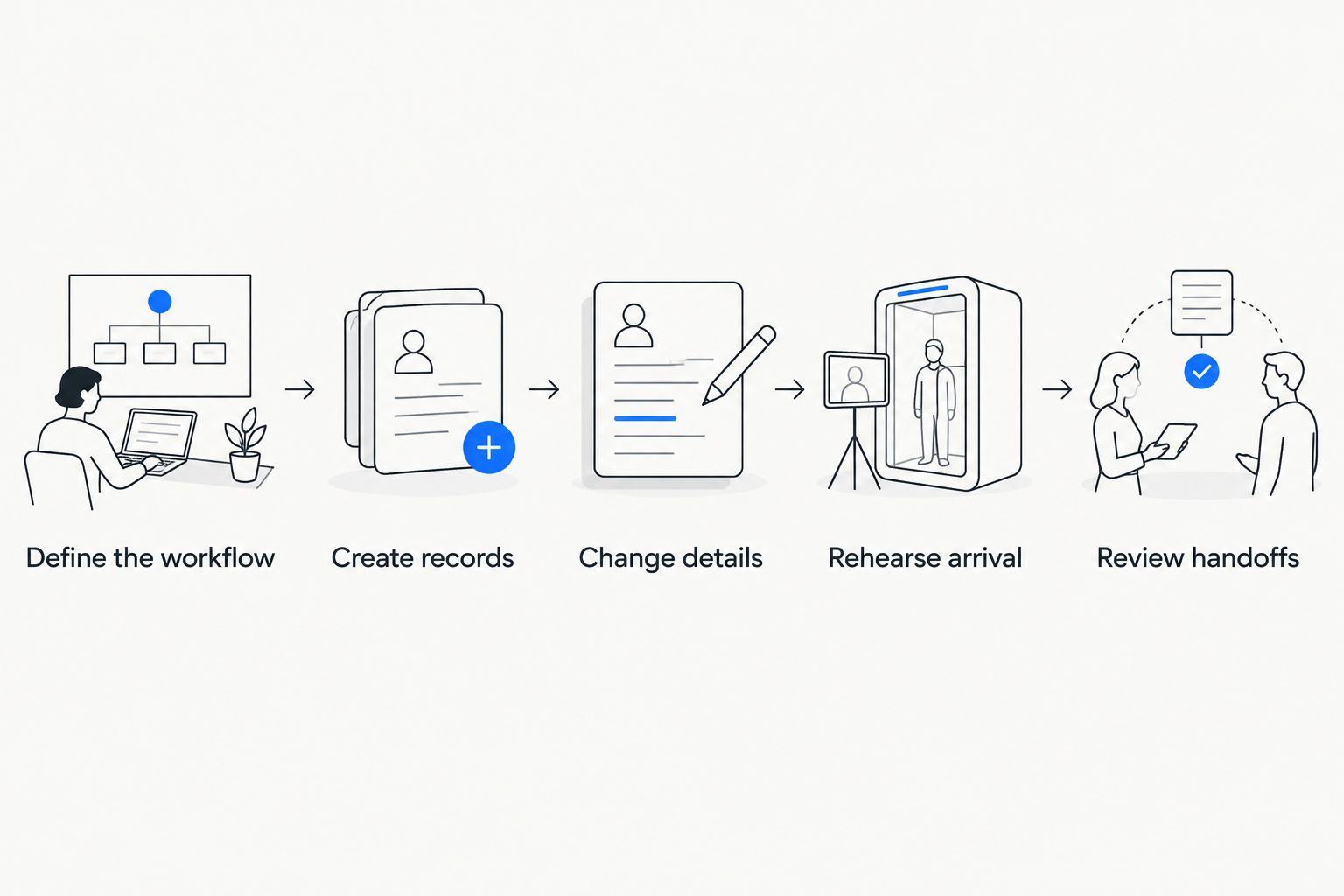
Test the handoffs between features, not just the features individually.
Finish the rehearsal by distinguishing confirmed behavior from unresolved questions. A requirement is not verified because someone says it is configurable; ask to see the available tools support the intended process.
Keep a written record of the steps staff must perform. That record becomes the starting point for training and exposes work that the product demonstration did not resolve.
Which requirements belong on your evaluation checklist?
Separate requirements into operational necessities and preferences. An operational necessity supports an admission rule, a staff responsibility, or an attendee-facing commitment. A preference changes how someone would like to work without preventing the event from operating.
For every necessary feature, write an acceptance statement. Replace a vague request such as flexible registration with a specific instruction: staff must be able to identify the registered attendee and understand the applicable ticket category during arrival. Then test the statement using your rehearsal.
Keep procurement and governance questions alongside the workflow checklist. Ask how your organization will handle permissions, attendee information, data access, support responsibilities, and contingency procedures. Get explicit answers rather than inferring them from a feature name.
Use the following recording format:
Required outcome: The decision or task the feature must support.
Demonstrated behavior: What the product actually showed.
Staff procedure: What your team must do manually.
Unresolved question: What still needs confirmation.
Accountable owner: Who accepts the workflow before launch.
Approve a working process, not a collection of promising labels. This gives your team a practical basis for choosing and configuring event software without turning the evaluation into a provider ranking.
Where Gathersmith LLC fits
Gathersmith LLC is event registration and operations software for organizers coordinating conferences, expos, and conventions in one configurable workspace. Its stated scope includes registration forms, QR badges and check-in, schedules, speakers, sponsors, exhibitors, and team operations.
The platform is new; the team's foundation is nearly a decade of experience running multiple events. Those are different facts. Organizer experience informs the product's positioning, but it does not replace demonstrating how the available platform tools fit your event.
Use the same acceptance checklist for this platform as for any other option. Its connected scope is relevant when registration and on-site operations need to work together. Its stated feature set is not evidence of an unlisted integration, specialized admission rule, or custom development commitment.
For a 2026 evaluation, bring a registration correction, a check-in exception, and a schedule change. Ask to see the resulting staff workflow rather than requesting a generic presentation.
Do you need separate event and session check-in?
Event check-in and session check-in answer different questions: whether someone arrived at the event and whether someone entered a particular session. Define which question your team needs answered before making session-level scanning a requirement.
If your program does not require session attendance records or session admission checks, do not add that workflow without a clear purpose. If it does, verify the specific process rather than assuming event check-in covers it.
Can you use one registration process across multiple event days?
A registration process can identify participation across an event, but your arrival policy still needs to define what staff do on later days. Decide whether subsequent visits require another check, a badge inspection, or a different procedure.
Then evaluate the software against that policy. Do not treat a single initial check-in as proof of attendance throughout a multi-day program.
FAQ
What event planning software features should a conference organizer prioritize?
Prioritize registration, attendee records, badges and check-in, schedules, speaker coordination, partner coordination, and staff ownership. Evaluate how those areas work together using a rehearsal based on your event's rules.
How do I know whether event software fits my conference?
Test the software against written acceptance statements drawn from your operating workflow. Include a registration correction, an arrival exception, and a schedule change rather than reviewing only an ordinary registration.
Does a QR badge replace a check-in procedure?
A QR badge does not replace a check-in procedure. Staff still need instructions for interpreting the result, resolving record mismatches, and escalating admission questions.
Should I collect session choices during registration?
Collect session choices when your event has a defined operational use for those answers. Decide who acts on the information and how changes affect your participation rules before adding the questions.
Is session check-in the same as event check-in?
Session check-in is not the same as event check-in. Event check-in records arrival at the event, while session check-in addresses entry or attendance at a particular session.
What does configurable event software mean?
Configurable event software lets organizers adapt available platform tools to their event's needs. It does not, by itself, promise custom development, an unlisted integration, or support for every admission policy.
What should staff practice before conference check-in opens?
Staff should practice identifying an attendee, handling a registration mismatch, and escalating an unresolved admission question. Include the person authorized to decide exceptions so the rehearsal tests the complete handoff.
One last thing
Before approving your workflow, ask someone who did not design it to explain what happens when an attendee's details change. Have that person identify the current record, the responsible staff member, and the next action without coaching.
That exercise tests something a feature checklist cannot: whether your operating plan makes sense to the people who must use it. If the explanation depends on knowing which private spreadsheet or message contains the answer, resolve the handoff before opening registration.
Your final deliverable is a usable event procedure, not a completed software checklist. Keep that procedure with your staff instructions and update it whenever the workflow changes.
Related guides
Explore this topic
Explore Gathersmith features — Review the connected registration, program and operations tools.
Event team management — Coordinate responsibilities and the work behind the event.
Conference and convention workflows — See how the platform supports a multi-part event.
Explore the demo — Try fictional event scenarios before choosing a workflow.