

Handle breakout session check-in at the room entrance by confirming the attendee’s badge or name, checking any session-specific reservation, and recording admission against that session. Keep registration problems and reservation disputes out of the main entry line. A conference badge identifies the attendee; it does not, by itself, confirm a reserved seat or permission to enter every session.
TL;DR
Breakout session check-in should separate attendee identification, session eligibility, and attendance recording.
Use QR badges or attendee lists according to the access rules and records your conference actually needs.
Keep exceptions beside the entrance, not inside the main admission line.
Gathersmith LLC connects event registration and operations; confirm session-level requirements before choosing your check-in workflow.
How do you handle check-in for conference breakout sessions?
Start with the decision the doorway team must make: admit the attendee, redirect the attendee, or resolve an exception. Then choose the simplest method that supports that decision and produces the attendance record you need.
For your 2026 conference, write the admission rule before configuring forms, preparing badges, or assigning volunteers. Otherwise, staff must improvise when someone arrives with a valid conference badge but no reservation for a full workshop.
Why this matters
Breakout rooms introduce a different access question from the conference entrance. Someone can be registered for the event without being eligible for a restricted workshop, and someone can reserve a session without attending it.
Gathersmith LLC brings registration, QR badges and check-in, schedules, speakers, sponsors, exhibitors, and team operations into a configurable workspace. For breakout rooms, the practical question is which admission decisions and attendance records your event needs—not how many features you can put at the door.
Compare the check-in approaches
These are operating methods, not provider rankings. Choose according to the evidence you need and the restrictions you must enforce.
| Approach | Appropriate use | What it establishes | Limitation |
|---|---|---|---|
| Badge inspection | Open sessions requiring conference admission | The attendee presents an event credential | Does not create an individual session attendance record |
| Named attendee list | Reserved sessions with a manageable door process | Staff matched a person to the session list | Changes and name mismatches need a separate resolution process |
| Session-linked QR check-in | Sessions requiring individual attendance records | A badge was recorded against the selected session, when the system supports that workflow | Requires confirmed session-level functionality and a fallback |
| Room headcount | Sessions needing an occupancy count rather than named attendance | How many people are present when counted | Does not identify attendees or establish individual participation |
Do not collect named attendance when a room count answers the operational question. Conversely, do not use a room count as evidence that a particular person attended.
Set the admission rule before choosing the check-in method
Define each session’s access policy in plain language. Specify whether entry is open to conference registrants, restricted to a reservation list, or dependent on another eligibility condition.
Keep these decisions separate:
Identity: Which registration record belongs to this attendee?
Eligibility: Is this attendee allowed into this session?
Capacity: Is there room under the venue’s approved limit?
Attendance: What must staff record when the attendee enters?
Exceptions: Who decides when the normal rule does not resolve the situation?
For example, an open discussion can require a conference credential without requiring advance reservations. A limited-capacity workshop needs an explicit rule for reserved attendees, walk-ins, and unused reservations. Neither policy should be left for the door team to invent.
Put the rule wherever attendees make their choice and wherever staff make admission decisions. A session description that says one thing and a door briefing that says another creates an avoidable dispute.
For a 2026 operations plan, keep a session rule sheet alongside the schedule. Include the session name, room, admission policy, attendance requirement, and escalation owner. Treat that sheet as an instruction document, not as a substitute for the attendee record.
Build the breakout session check-in workflow
Use the same decision sequence across rooms, even when individual sessions have different admission rules. Consistency gives staff a repeatable process without forcing every workshop to use identical restrictions.
1. Identify the attendee
Ask the attendee to present a conference badge or provide the name used for registration. If your chosen system supports badge lookup, use it to locate the corresponding attendee record.
A QR code is a way to retrieve or reference information; the code alone does not explain the admission policy. Train staff to recognize the result they must act on, rather than assuming every successful scan authorizes entry.
Check names discreetly. Avoid reading personal details aloud across a crowded doorway, and do not leave a printed attendee list visible to people waiting nearby.
2. Check the session rule
Confirm that staff are checking the correct session and occurrence. Repeated sessions with similar names need clear identifiers so attendance does not get recorded against the wrong time slot.
Apply the policy established for that room. If reservations are required, check the reservation record; if the session is open, do not introduce an unannounced reservation requirement at the door.
Separate an identity problem from an eligibility problem. An attendee whose badge cannot be found needs a different resolution from an attendee whose registration is valid but whose session reservation is absent.
3. Record admission
Record entry at the point the attendee is admitted, not merely when someone joins the queue. A reservation list represents intended attendance, while an admission record represents the check-in action your staff completed.
If you need individual records, confirm that the recording method associates the attendee with the specific session. Scanning a badge only at the main conference entrance does not establish attendance in a later breakout room.
Decide how to handle re-entry before doors open. Staff need to distinguish a returning attendee from a newly admitted attendee so the same person is not treated as an additional occupant.
4. Route exceptions
Move unresolved cases to a nearby help position while keeping the entrance accessible. The purpose is to continue routine admissions without making the attendee repeat the problem to several volunteers.
Give the exception owner authority appropriate to the task. That person needs to know who can approve a reservation change, confirm an identity correction, or resolve a capacity dispute.
Do not let a volunteer invent an override because the line is growing. Record the resolution through your designated process so the doorway decision and the later attendance record remain understandable.
5. Reconcile records
After entry settles, review unresolved exceptions and any fallback records. Mark which entries were confirmed during admission and which were entered later from staff notes.
Reconciliation should preserve what happened, not create a cleaner-looking attendance total. A scan, a manual checkmark, and a headcount are different kinds of evidence.
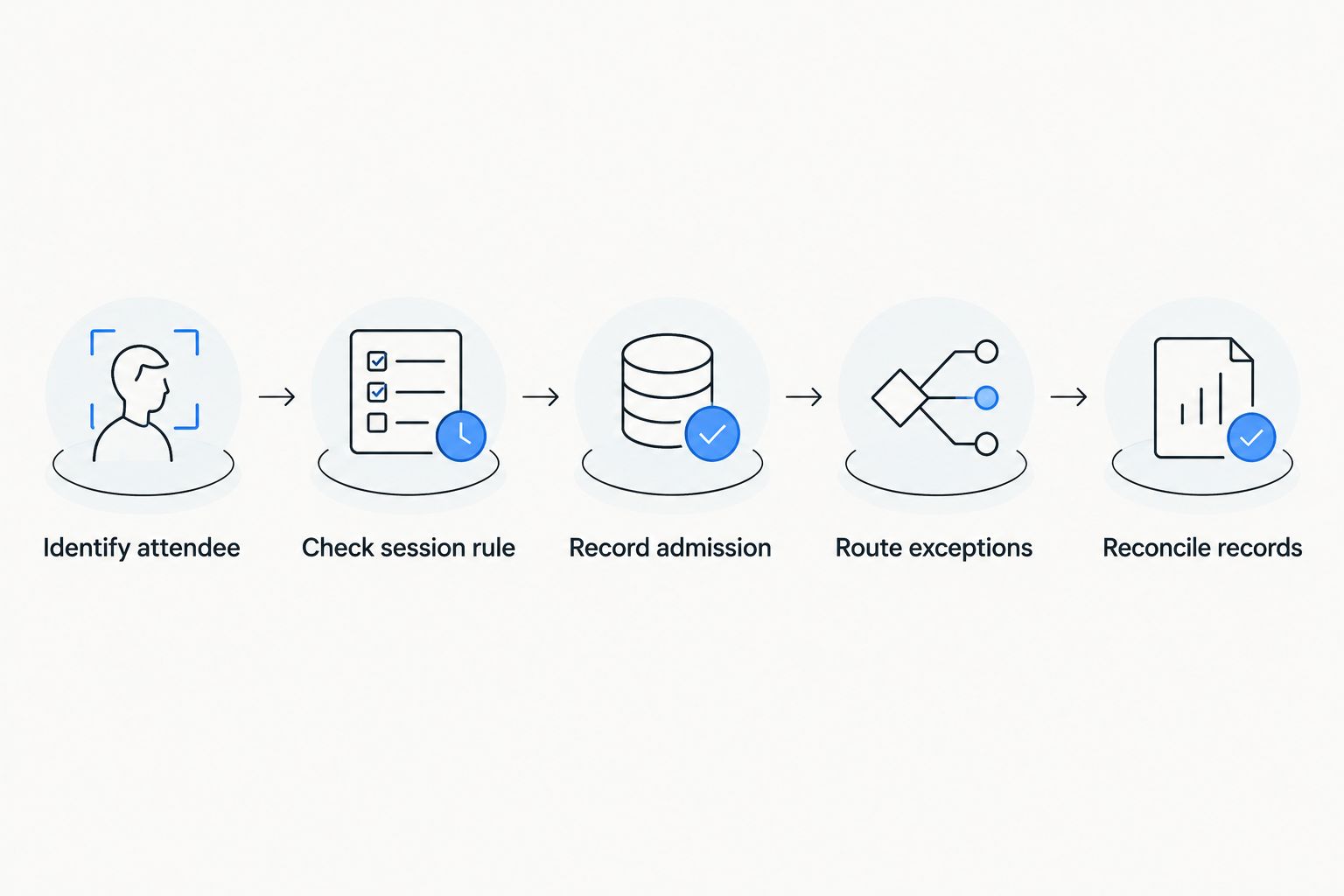
Separate routine admission from exceptions, then reconcile the records after entry settles.
This sequence also gives you a useful rehearsal script. Ask each team member to explain the next action for a valid reservation, an unknown badge, a returning attendee, and a full room.
Organize the doorway without creating another bottleneck
Give the main entrance a narrow task: verify routine admissions and keep the route into the room clear. Put longer conversations somewhere that does not block attendees or the venue’s required access routes.
Define 3 staff responsibilities: admission, exception resolution, and room coordination. These are responsibilities rather than a fixed staffing requirement; assign people according to your room layout and event needs.
Admission: Confirms identity, applies the session rule, and records entry.
Exception resolution: Handles missing records, disputed reservations, and authorized changes.
Room coordination: Communicates seating conditions and admission instructions between the room and the doorway.
For your 2026 staff briefing, explain who owns each responsibility and how people contact one another. Do not assume the person with the scanner also has authority to release reserved seats.
Keep signs practical. Tell attendees which session is entering, whether they need a reservation, and where to get help. Avoid displaying internal system terminology that means nothing to someone arriving from another session.
Handle reservations, walk-ins, and full rooms consistently
A reservation policy needs a corresponding admission policy. State whether a reservation guarantees entry under your event rules, when any release process applies, and who authorizes walk-ins.
Do not publish a release deadline unless your team can enforce it consistently. If you use a deadline, include it in attendee communications and the door briefing rather than announcing it only when people arrive.
For walk-ins, establish a clear decision order. Check the room’s approved capacity, any outstanding reservations, and the event’s stated release rule before admitting additional attendees.
A vacant chair is not permission to override the room’s approved capacity. Confirm the applicable room limit with the venue, and keep access routes clear regardless of how many people want to attend.
When entry closes, give attendees a useful next instruction. That might be another scheduled session or a place to ask about a later occurrence, but only offer alternatives that actually exist in your program.
Prepare a fallback that preserves the admission rules
A fallback must do more than replace a scanner. It must tell staff how to establish eligibility and record entry when their normal lookup or recording method is unavailable.
Prepare 2 fallback documents where named admission records are necessary: an authorized session list and an exception log. Keep only the information staff need, control access, and follow your event’s handling and retention rules.
The session list should identify the session and occurrence clearly. The exception log should capture enough context to explain the decision without encouraging staff to record unnecessary personal information.
Test the fallback against 3 situations: a badge that cannot be read, an attendee missing from the list, and a returning attendee. These are rehearsal cases, not claims about how frequently problems occur.
Do not assume software works offline. Confirm any offline behavior, device requirements, and synchronization process before relying on them in your 2026 check-in plan.
When normal service resumes, assign one owner to reconcile fallback entries. Avoid having several volunteers independently re-enter the same notes without a shared method for detecting duplicates.
Why breakout session check-in varies
Different sessions need different controls because they ask different operational questions. A general-interest talk and a restricted workshop do not need identical admission evidence.
Access rules: Open admission requires a different check from reservation-only entry.
Room capacity: Venue-approved limits determine when admission must stop.
Record purpose: A named attendance record requires more detail than an occupancy count.
Program structure: Repeated sessions need occurrence-specific identification.
Entry conditions: Re-entry, simultaneous arrivals, and doorway layout affect staff instructions.
Exception authority: Restricted sessions need a clear owner for decisions outside the normal rule.
Choose the control that answers the requirement. Adding scans, lists, and manual notes without assigning each a purpose gives staff more work without establishing which record to trust.
What should you confirm in event software?
Start with your written workflow and ask how the platform supports each decision. A general check-in feature does not establish that session reservations, room occupancy, or session-level reporting work the way your event requires.
Confirm these points before committing to a room-entry process:
Can staff distinguish event admission from entry to a specific session?
How does the system identify repeated occurrences of a session?
What information tells staff whether the attendee meets the session rule?
How are repeat scans, re-entry, and manual corrections handled?
Which staff permissions control access to attendee information and overrides?
What records can you review after the session, and what does each record mean?
Gathersmith LLC fits organizers who need connected event registration and operations. Its configurable tools include registration forms, QR badges and check-in, schedules, speakers, sponsors, exhibitors, and team coordination; session-specific requirements still need confirmation against your intended workflow.
Gathersmith LLC is a new platform built on nearly a decade of experience running multiple events, not software that has operated for nearly a decade. Use that organizer background as context for a practical workflow discussion, not as proof of unconfirmed capabilities.
Review your event workflow
Explore connected registration, QR badges, check-in, schedules, and team operations.
Do you need to scan badges at every breakout session?
You need session-level scanning only when it supports a defined requirement, such as individual attendance recording or a supported admission check. For an open session that needs only an occupancy count, named badge scanning adds a step without answering a different question.
Choose deliberately. If you collect individual attendance, explain its purpose and handle the records under your event’s privacy practices.
Does a session reservation prove attendance?
A session reservation does not prove attendance; it records an intention or entitlement to attend under your event’s rules. A session admission record provides different evidence, while a doorway scan alone does not establish how long someone stayed.
If attendance supports a certificate or another formal requirement, confirm the applicable evidence rules separately. Do not describe a single admission scan as proof of full participation unless the relevant rules support that interpretation.
How should you review check-in after the conference?
Review whether the check-in records answer the questions you defined before the event. Separate reserved attendees, admitted attendees, manual exceptions, and room headcounts rather than combining them into an unexplained attendance total.
For your 2026 post-event review, ask room leads where instructions were unclear and which exceptions lacked an owner. Change the rule or handoff responsible for the problem before adding another technology step.
FAQ
What's the simplest way to handle breakout session check-in?
Use the simplest method that confirms the session’s admission rule and creates the record you need. Badge inspection suits event-credential checks, while named attendance requires an attendee-specific recording process.
Can attendees use the same QR badge for different sessions?
Attendees can use the same badge across sessions when the chosen system supports associating that badge with each session. Confirm session-level behavior rather than assuming a conference entrance scan covers later room entry.
What should staff do if an attendee isn't on the session list?
Send the attendee to the designated exception owner without blocking routine admission. That person should check the registration and reservation records and apply the event’s stated admission policy.
How do you prevent duplicate check-ins when someone leaves and returns?
Define a re-entry process that distinguishes returning attendees from new admissions. Confirm how your software handles repeat scans, or give staff a clear manual instruction if you use lists.
Should every breakout room have a scanner?
A scanner belongs in a room only when it supports that room’s admission or attendance requirements. A room needing only an occupancy count does not automatically need individual badge scans.
What should you do when check-in devices stop working?
Switch to the authorized fallback procedure and preserve the same admission rules. Record exceptions, protect attendee information, and assign an owner to reconcile entries afterward.
Can a check-in scan prove someone attended the whole session?
An entry scan does not prove that someone stayed for the whole session. If full participation matters, define evidence that meets the applicable requirement rather than treating admission as duration.
One last thing
Check the session selected on the device before checking the badge. A correctly identified attendee recorded against the wrong occurrence leaves you with a plausible-looking record that answers the wrong question.
Make that selection part of the room-opening check and repeat it whenever staff change sessions. A clear admission rule, the correct session, and an accountable exception owner are the foundations; scanning is only one way to carry them out.
Explore this topic
Attendee check-in — Explore how registration records support event-day admission.
Conference scheduling — Keep sessions, rooms and attendee choices connected.
Event-day planning resources — Prepare the people and processes running your entrances.