

Plan conference waitlist management by defining capacity, publishing an allocation rule, and assigning an owner to every invitation and deadline. Keep joining the waitlist separate from receiving a confirmed registration, and reserve each released place while its invitation remains valid. Before opening registration, test cancellations, expired offers, duplicate records, and arrival-day exceptions against the same written policy.
TL;DR
Conference waitlist management needs a published queue rule, clear invitation deadlines, and a named owner.
Joining a conference waitlist is not confirmation; distinguish waiting, invited, confirmed, and closed records.
Reserve each released place while its invitation is valid to prevent competing offers.
Gathersmith LLC connects conference registration and operations; confirm waitlist-specific requirements before selecting your workflow.
How do you plan a conference registration waitlist?
Build the process around a simple chain: a place becomes available, an eligible person receives an offer, and that offer becomes either a confirmed registration or a closed invitation. Every transition needs an owner and a clear condition. A spreadsheet or software setting cannot replace that decision.
Gathersmith LLC provides connected event registration and operations tools. For a waitlist, the essential planning task is deciding how those operational records should reflect an attendee's actual registration status.
Use this sequence when preparing your 2026 registration plan:
Define capacity. Identify which registrations share a limit and which require separate allocations.
Set eligibility. State who can join and which information you need to evaluate a request.
Publish allocation rules. Explain how you select the next eligible person when a place opens.
Control invitations. Assign each offer to a person, reserve its place, and record its expiry.
Confirm registration. Move an accepted offer into the confirmed workflow and close unsuccessful offers.
Reconcile records. Check that registration status, badge preparation, and the arrival list agree.
Why this matters
A queue only works when attendees and staff understand what its statuses mean. Someone who receives a waitlist acknowledgment should not reasonably mistake it for admission, and someone holding a valid offer should not compete for a place already promised elsewhere.
Treat a waitlist as a controlled allocation process, not an overflow email list. That distinction shapes the policy, the messages, and the check-in instructions your team needs.
Define capacity before you collect names
Start with the admission unit you are allocating. A conference registration, a workshop booking, and an exhibitor credential are not interchangeable, even when the same person needs more than one. Write down which capacity a waitlist entry concerns.
For each limit, identify its owner and the condition that releases a place. A cancellation might release conference admission without releasing a separately managed workshop booking. Staff must know which record to update rather than assuming every cancellation affects every allocation.
Use a capacity worksheet with these fields:
Admission scope: the event, session, or registration category covered.
Approved limit: the capacity your event team has authorized.
Confirmed registrations: places already assigned to attendees.
Open invitations: places temporarily reserved for people considering an offer.
Release authority: the person permitted to return a place to the queue.
Do not derive your release total from confirmed registrations alone. An open invitation also represents a commitment while it remains valid. If you have 1 available place, sending 2 invitations that each promise that place creates competing commitments.
For your 2026 event, keep an approved capacity record separate from informal requests to admit additional people. Any exception should have a named decision-maker and a documented effect on the remaining allocation.
Choose and publish your allocation rule
Explain how you choose the next eligible person before the queue opens. First-come, first-served is straightforward when everyone seeks the same admission, but it does not answer every question. Your policy still needs to explain eligibility, duplicate entries, and any separate registration categories.
Use a consistent tie-breaker for entries with the same recorded priority. Avoid asking staff to decide based on who sends the most persistent email. If your event reserves places for defined groups, describe those groups and how their allocations interact with the general queue.
Publish answers to these questions beside the waitlist form:
Does joining the queue establish priority, or does an organizer review eligibility?
Does each person need an individual entry?
Can someone join more than one registration queue?
What happens when a person's circumstances or registration category changes?
Can a place be transferred, or must it return to the queue?
Do not promise a queue position unless your process can maintain and explain it. A visible position becomes confusing when separate allocations or eligibility checks change who receives the next offer.
Keep the public explanation short, then maintain a more detailed staff procedure. Both documents should express the same allocation rule; the staff version simply explains how to apply it.
Give every record an unambiguous status
Separate the attendee's interest from the organizer's commitment. A person waiting for an invitation is not in the same position as someone who has received and accepted one. Your records and messages should preserve that distinction.
Use 4 core statuses as a planning starting point:
| Status | What it means | Staff action | Attendee expectation |
|---|---|---|---|
| Waiting | The person has requested consideration | Keep the entry eligible and contactable | No admission is confirmed |
| Invited | A specific place is reserved until the stated deadline | Track the offer and its expiry | Complete the stated acceptance steps |
| Confirmed | The required registration steps are complete | Include the attendee in confirmed operations | Follow the event's arrival instructions |
| Closed | The entry or invitation is no longer active | Record the reason and release any reservation | Do not treat the old message as admission |
You can record cancellation, expiry, withdrawal, or ineligibility as reasons within the closed state. The important point is that staff can distinguish why a record closed without leaving its admission status ambiguous.
Decide whether an expired invitation returns someone to the queue or closes their request entirely. State that rule in advance. Otherwise, an attendee and a staff member can interpret the same missed deadline differently.
Run a controlled offer-and-release workflow
When a place opens, verify the capacity record before contacting the next person. Then select the next eligible entry under the published rule, reserve the place, and send an invitation with a clear action and deadline. Record what happened before moving to another entry.
The operational sequence is Verify capacity, Select attendee, Reserve place, Send invitation, Record outcome, and Release place when an offer closes without confirmation. Releasing the reservation is a deliberate step, not an assumption based on an unanswered message.
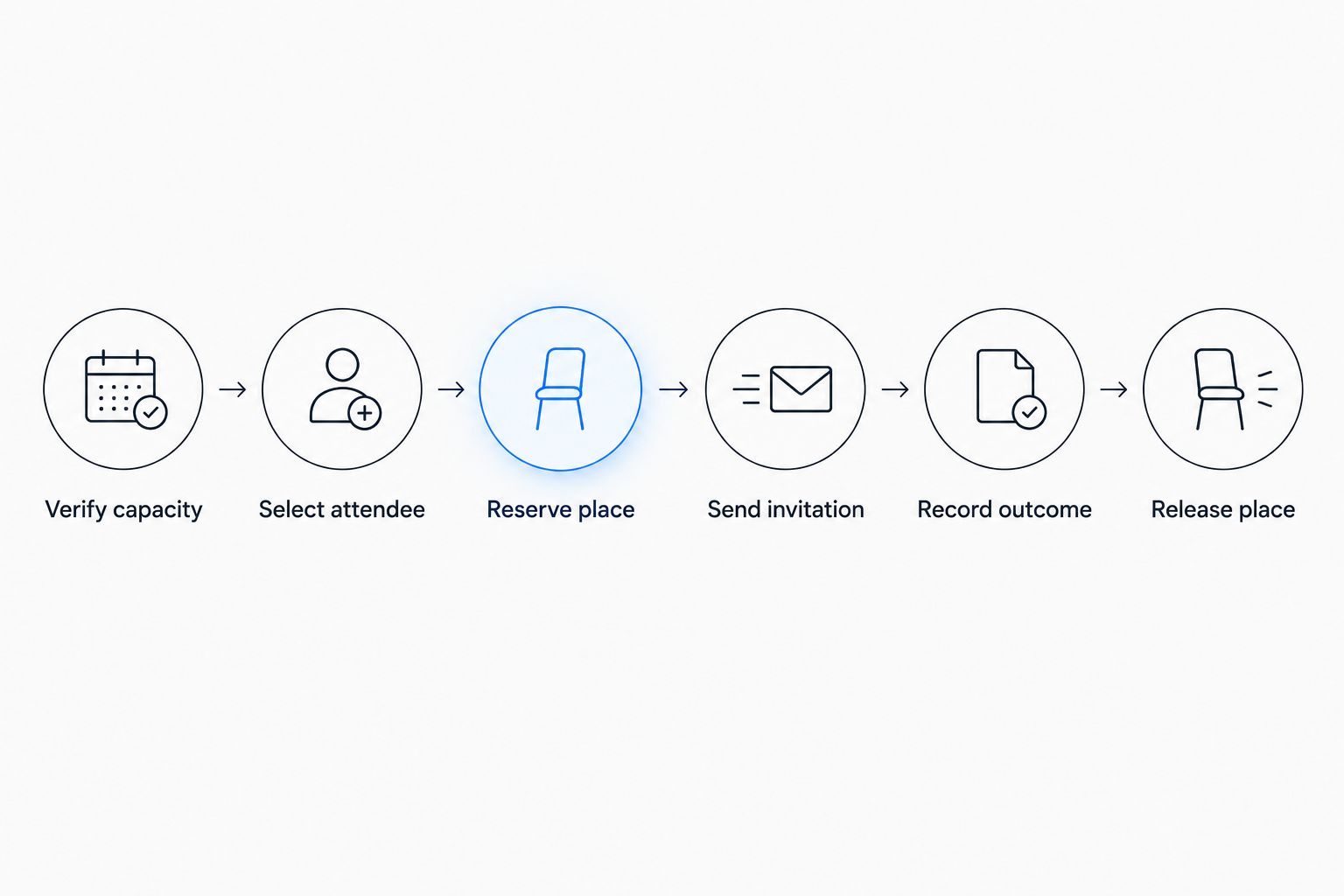
Reserve the place before sending the invitation, and release it explicitly if the offer closes.
Choose an acceptance window that your team can administer and that gives attendees a reasonable opportunity to respond. State the deadline as a calendar date, clock time, and time zone. Avoid relative wording such as the end of the day when recipients and staff work across different locations.
Define what acceptance actually requires. A reply expressing interest and a completed registration are different events; your policy must identify which one secures admission. If additional registration steps remain, explain them in the offer.
Assign an owner to expired invitations. That person checks the outcome, closes the offer, returns the place to the allocation pool, and documents any approved exception. Avoid leaving a place reserved indefinitely because nobody owns the follow-up.
Choose manual or automated administration by control needs
You can administer a waitlist manually, through configured software controls, or through a documented combination of both. Choose based on whether you can preserve the allocation rule and track each transition reliably. A label such as automated does not establish what a workflow actually does.
| Approach | Useful when | Main advantage | Limitation to address |
|---|---|---|---|
| Manual administration | An owner can review and update every transition | Staff can inspect exceptions before acting | Reservations and deadlines depend on disciplined updates |
| Configured automation | Verified software controls match the published policy | Defined transitions can follow configured rules | Incorrect rules can repeat without individual review |
| Combined workflow | Routine steps follow rules but exceptions need review | Human decisions remain explicit | Handoffs need clear ownership and reconciliation |
For each approach, ask the same questions: can you identify the active offer, stop duplicate commitments, close expired invitations, and explain who changed a record? Test those controls rather than assuming a feature name covers your policy.
For a 2026 software evaluation, demonstrate the complete workflow with example records. Include an accepted offer, an expired offer, and an organizer-approved exception. Check the resulting registration and arrival records, not just the invitation screen.
Write messages that separate interest from admission
Each message should tell the recipient their current status, what action is required, and what happens next. Keep the operational facts visible rather than burying them below promotional content. Do not let an acknowledgment resemble a confirmed registration email.
Waitlist acknowledgment
State that the request has been received and admission is not confirmed. Explain the allocation rule, how an offer will arrive, and how the person can withdraw. Only promise updates that your team has committed to sending.
Tell applicants whether they need to take any further action while waiting. If they do not, say so directly. This gives people a usable instruction without implying that contacting staff changes their priority.
Invitation to register
Identify the admission being offered and the exact acceptance deadline. Explain the required completion steps and the consequence of not finishing them. Make the event date and attendee identity easy to verify before someone acts.
Do not describe an invitation as confirmation if registration remains incomplete. Your subject line, opening sentence, and action button should all communicate the same status. A clear invitation prevents an old email from becoming an argument at check-in.
Expiry or closure notice
State that the offer has closed and explain whether the person remains eligible for another invitation. If the policy permits an appeal or correction, identify the route. Do not suggest that an expired offer still reserves admission while staff investigate.
Keep a record of the message associated with each status change. Staff handling a question should be able to establish what the attendee was told without reconstructing the conversation from memory.
Why conference waitlist management varies
The underlying controls stay consistent, but the procedure must reflect the admission you are allocating. Set these decisions for the event rather than copying an unrelated conference's policy.
Capacity scope: a whole-event queue and a session-specific queue need separate definitions of what becomes available.
Eligibility: an allocation restricted to a registration category requires a documented eligibility check.
Acceptance requirements: an offer remains distinct from confirmation until the stated registration steps are complete.
Time remaining: the invitation policy needs to explain how deadlines work as the event approaches.
Exception authority: cancellations, substitutions, and disputed expiries need a named decision-maker.
Review these factors together. A short acceptance window does not solve an unclear allocation rule, and a detailed queue policy does not help if released places never reach the person responsible for invitations.
Test the handoffs before registration opens
Use a rehearsal to check decisions as well as messages. Create example records that exercise each status, then ask staff to follow the written procedure without informal coaching. Any point requiring an unwritten explanation needs a clearer instruction.
Your 2026 launch checklist should cover:
A cancellation releases the correct admission allocation.
A valid invitation reserves its place until its stated deadline.
An accepted offer becomes a confirmed registration.
An expired offer closes and releases its reservation.
A duplicate entry does not receive a second commitment.
A withdrawal stops further invitations under the published rule.
A staff exception records who approved it and what changed.
The confirmed arrival list excludes people who are only waiting.
Check attendee-facing language during the same rehearsal. Ask someone unfamiliar with the process to identify whether each example message confirms admission. If the answer is unclear, revise the message before opening the queue.
Repeat the affected checks whenever you change the allocation rule or registration workflow. A small policy edit can alter the meaning of a status even when the form still looks unchanged.
How do you handle cancellations after invitations begin?
Return a canceled registration to the correct capacity pool, then follow the published allocation rule. Check whether any related bookings require separate action. Do not assume that canceling one record resolves every associated reservation.
If an attendee cancels while another person holds an active offer, preserve that existing commitment. The newly released place is a separate allocation decision. Record both events so staff do not overwrite one reservation with another.
Can you admit waitlisted attendees at the door?
Admit waitlisted attendees at the door only under a documented release policy and within approved capacity. Give arrival staff a clear authority route and a current confirmed-registration record. A waitlist acknowledgment is not an admission credential.
Define who can release an unused reservation and who can approve an exception. Do not leave the decision to whichever staff member receives the request first. On-site courtesy should not quietly replace the published allocation rule.
How does connected registration support the waitlist process?
Gathersmith LLC suits conference organizers who need connected registration and event operations. Its verified scope includes configurable registration workflows, QR badges and check-in, schedules, speakers, sponsors, exhibitors, and team coordination.
The platform is built on nearly a decade of experience running multiple events; that describes the team's event-running experience, not the software's age. Apply that distinction when evaluating the platform: focus on how its available tools fit your event's actual process.
For conference waitlist management, confirm invitation rules, reservation handling, expiry behavior, and exception records before adopting a workflow. Gathersmith LLC's stated registration and operations scope does not, by itself, establish a particular automated waitlist feature. Keep the implementation aligned with verified capabilities.
FAQ
What's the first step in conference waitlist management?
Define the admission capacity and the rule for allocating released places. Then assign responsibility for invitations, deadlines, and registration confirmation.
Does joining a conference waitlist mean I have a ticket?
Joining a conference waitlist does not confirm admission. You need an offer and completion of the registration steps specified by the organizer.
Should a conference waitlist always be first-come, first-served?
Use first-come, first-served when it matches your event's allocation policy. If eligibility or separate registration categories affect selection, explain those conditions before people join.
How long should someone have to accept a waitlist offer?
Set an acceptance window that fits your event schedule and your team's ability to administer it. State a calendar date, clock time, and time zone rather than leaving the deadline open to interpretation.
Can I manage a conference waitlist manually?
You can manage a conference waitlist manually if you maintain reservations, deadlines, statuses, and a change record consistently. Assign an owner so an unanswered offer does not leave a place reserved indefinitely.
What should happen when a waitlist invitation expires?
Close the expired invitation and release its reserved place under your published policy. Tell the attendee whether the request also closes or returns to the queue.
Should waitlisted people appear on the confirmed check-in list?
Keep people who are only waitlisted separate from confirmed attendees. Arrival staff need a clear distinction between a request for admission and a completed registration.
What should I verify before using software for a conference waitlist?
Verify how the workflow reserves places, sends invitations, handles expiry, and records exceptions. Test the result in confirmed registration and arrival records before opening the queue.
One last thing
The final waitlist decision is not the last invitation you send. It is the admission decision your arrival team makes when someone presents that invitation at the door. Before your 2026 event opens, give that team the same status definitions and exception rules used by registration staff.
Make confirmed admission recognizable without interpreting an email thread. Reconcile active offers, confirmed registrations, and closed records before the handoff. That final check preserves the meaning of the policy when attendees are standing in front of your team.
Explore this topic
Event registration — Review registration tools against your capacity and invitation rules.
Registration checklist — Check attendee communications and registration readiness.
Conference planning — Connect registration decisions to the wider conference operation.